The GMTK 2026 Game Jam is just coming to a close, and here is my after-jam reflection! I’ll tell you about my 96 hr process and my thoughts on how it went.
Process and Reflection
My process is going to be split into 4 sections organized by day: Wednesday, Thursday, Friday, and Saturday.
Wednesday
On Wednesday the theme was released at 12:00 PM. I got to brainstorming right away, along with my team. We came up with a number of ideas to fit the theme “Countdown”, but I’m just going to tell you one of them. Here’s our initial thought:
“Platformer. You start out as a normal character, but as soon as you collect some potion, and go through some door, etc. then a countdown starts. It goes 3…2…1…swap! And you change into a different creature, with a different ability. Every creature’s special ability is triggered by a random keyboard key (which you know, but won’t know until you change). To get through the level, you have to use various special abilities. There will be potions (or something else) to extend the countdown timer.”
It was around 1:30 or 2 pm when we came up with this, and we went with it. I wrote our Game Development Document, with all the information for our game. I decided on either PICO-8 or 1-bit color palettes, as I wanted it to look very retro. I came up with a list of creatures, and then we wrote a story for the game. This is what I wrote based on the team’s ideas:
“There’s a wizard, who is stirring a potion in a cauldron. His words type across the screen: ‘My life’s work is finally done! A potion of untimely transformations…what a waste of time.’
Then the screen switches to a bird.
The player is a bird, who is flying. The bird somehow crash lands into the cauldron, being cursed with its effects.
The wizard, realizing that he now has a test subject, locks the player (still a bird) up in a dungeon. The objective of the game is you have to escape the dungeon using various techniques (being a mouse to fit through a crack, etc.). The dungeon is a maze.
But the goal of the game is to escape the dungeon, defeat the wizard (maybe when the player is the rock), and get some sort of antidote.”
I ended up cutting the maze out of the game, for lack of time. We really tried to lean into a whimsical style, however I think our 1-bit palette choice takes away from it.
It was only mid-afternoon now, and I took advantage of the rest of the afternoon to get the core mechanics down. I finished those, and designed a prototype level. I used an old animation I had drawn for the bird character, and worked with that. Overall, the latter half of Wednesday was packed, but successful.
Thursday
On Thursday, I designed the mouse character. Honestly, I can’t remember everything I did on Thursday. After a while, it just starts to blend together… Apart from that, I designed the first five levels. Designing the levels took longer than I would have wanted, but it sure was fun. I turned our story from Wednesday into the animation for the game, and designed an opening screen for the game. I also started planning out Friday’s work, and designed the fish character.
Friday
Friday was just as packed as the previous two days. I got into working, and created the frog character. Initially, I wanted it to be a pretty well rounded character, but in the end, his tongue was the main focus. The tongue is still a little bit finicky at times, but it’ll work. For the last character in the game, I wanted it to be a rock at first. (You were supposed to defeat the wizard in the end by falling on him.) I decided that this would be hard to recognize in the 1-bit style, so I changed it. After several iterations, I landed on a flower pot. I also designed the story at the end of the game, and the rest of the levels.
Saturday
On Saturday, I finished the game. I drew, animated, and coded the final wizard boss and the area where you fight him. I spent the majority of the day on this and then added the end credits. Just before 1:00 pm, my teammate finished the music, and we added that in. I am writing this at 2:00 pm, and the plan is to test and upload the game this afternoon.
Reflection
Man, our game was such an improvement from last year. I can’t say how thankful I am to all the people who helped while we made our game. Beautiful music, great ideas…it was a lot more than I expected. The overall look of the game is good. I think I might choose full color next time, but the 1-bit art definitely made it faster to create. The code is a little sloppy at times, but it works…so…
I’m excited to see how the rating period goes. I think we’ve really done a lot better since last time, and I can’t wait to know the results! Thank you, GMTK 2026.
Another issue! You can check it out here here.
I've also pasted the title here:
Correctly type hinted methods do not show up in the method picker when connecting signals with type hints for custom classes.
After completing the MRP, I checked that the issue was still releavent for 4.7.1 Stable (my current version). It was, so
I got to researching. Another contributer had already found out where the issue was in the code, and I based my research
after that.
Let me explain what's happening before I go further. When you connect a Node's signal to another script, you have the option
to connect to an existing method. If there is an existing
compatible method, it will show it as an option. The
method is compatible when it has all the same arguments passed in it.
The problem arises here. If we create a custom signal, with an argument that is a custom class, (using class_name), and try
to connect that to a function we have written that takes this custom class as an argument, we will notice that the function
we wrote won't come up as compatible. Why? Because it is a custom class. But why doesn't it treat all class the same?
I looked at the code where the issue was, and it used something called ClassDB, which is a list of every class. But in the docs:
Note: Script-defined classes with class_name are not part of ClassDB, so they will not return reflection data
such as a method or property list. However, GDExtension-defined classes are part of ClassDB, so they will return
reflection data.
It explains that ClassDB
doesn't include custom classes defined by class_name.
So I went in search for something else. As I was scrolling through the docs, this caught my eye:
Use ProjectSettings.get_global_class_list() to get a list of script-defined classes instead.
This blog post isn't done yet! Come back soon.
Read about my GMTK 2025 Game Jam experience!
The game we made, called Logic Loops (the theme was “loop”),
is a puzzle solving logic game were you must move blocks out
of the way in order to draw a loop. When clicked, each block
moves the direction of the corresponding arrow on the center
of the block.
You can play our game here.
Journey
Our game plan went something like this:
- Concept planning
- Drawing and animation
- Coding
- Level design
- Upload to Jam website
Concept Planning
We started on the 3rd day of the jam, and did concept planning.
In our orginal idea, players would have to create an animation
loop using different mechanisms in the game. We decieded that this
did not fit very well into the theme–so we changed to a different
idea. In our new idea, players would move blocks out of the way
to open up a path. They would then move a person through the path,
to the next level. The entire path would form a loop.
Drawing and animation
After this, we came up with several prototypes for the blocks that
the player would move out of the way. After several iterations,
we came up with this design:
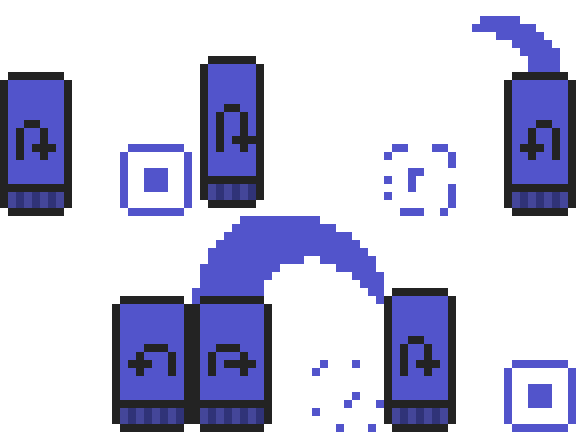
In all we made (and animated) 3 types of blocks:
- Orange, which moves left and right.
- Blue, which hops left and right.
- Green, which moves up and down.
Coding
We used the Godot Game Engine.
Blocks
Each block is an AnimatableBody2D with a basic script for each
type of block. We used an AnimationPlayer node to handle all
the movement and a RayCast2D to check whether the block could move.
then we animated the CollisionShape2D’s position too, so that we
could write very very little code.
Basically all the code does, is get input (check when the mouse clicked it),
and move the block according to its direction.
No Player
About halfway through coding it, we decieded that just having a loop as the
map just didn’t quite fit the theme well enough. We brainstormed for a little
while, and came up with this new idea:
Players move blocks out of the way of a path, and then draw a loop around
the path to beat the level. In order to draw the loop, players will need
to move blocks in different orders to make space.
In order to do that, we needed to make the loop:
Loop
The code for the loop is a little bit more complicated. We used a TileMapLayer
for the loop. What it should do, is place down a tile (from our loop terrain)
where ever the mouse is clicked (or click and drag). It should not be placed
if there is a block already there.
We created a terrain for the loop, and used set_cells_terrain_connect() in
the code to add tiles when a tile was placed.
In order to check whether a spot that was clicked (to make a loop) did not
have a block in the way, we put blocks in a group called “blocks”. Then,
when a spot was clicked, we checked whether any nodes in the group “blocks”
had the same position. If there was, the loop would not be placed.
The loop also handled when the level was beaten. When there were no tiles left
with the ID of the tiles that were used to show the end of a loop, the level
was won.
Level design
We designed 4 levels. Each one of the levels was there show what the game
was like; they weren’t very hard at all. By the time we got around to making
more levels, we had very little time before submission time was over, so
we decieded to leave it as it was.
Upload to Jam
About 4 hours before submission time was over, we uploaded our game.
Before, however, we first test ran our game. We then exported to HTML5,
and uploaded our game to Itch.io, using this
guide.
Reflection
What went well
For the most part, I think most of this jam went pretty well. We
followed our plan, and were able to upload a game. We got a lot of
great feedback!
What went bad
We started a couple days late. Had we started earlier, I think we would
have been able to make more levels and maybe refine a couple of thing.
The general concept of the game was rather simple too, I think with more
time and a better game plan we could have done a lot better.
What to improve
The first thing I would improve is the number of levels–we only made 4.
I would like to create more blocks, like a block that hops up and down,
and potentially enemies the would move around, and also block your path.
I would probably make the blocks smaller, so that they would fit into 1 tile.
Several other participants had very similar ideas to ours, but added another
factor, like time.